How Does a Tuya WiFi door sensor Google Home and Smart Life?
A WiFi door sensor Google Home setup is an integration in which a Tuya-compatible magnetic contact sensor detects whether a door or window is open or closed, reports that status to the Smart Life app, and may share supported functions with Google Home. It is a sensor, not a smart lock: it can detect, report, trigger, and automate, but it cannot physically lock or unlock a door unless a separate compatible actuator or smart lock is installed.
For B2B buyers, a logo or generic “Tuya compatible” claim is not enough. Test the exact product, firmware, data points, app region, and Google Home exposure before mass production.
What Is a Tuya WiFi Door Sensor?
A Tuya WiFi door sensor has a sensor body and magnet. As the door opens, the magnet moves away, the internal contact changes state, and the sensor reports the event through WiFi.
In a typical WiFi door sensor Google Home architecture, Smart Life handles onboarding, events, alerts, and Tuya scenes. Google Home is reached through account linking. The sensor does not operate a latch, deadbolt, or motor.
To understand the complete signal path from the magnet and reed switch to the router, cloud, and smartphone app, learn more about how WiFi door sensors work.
How Does Smart Life Pairing Work?
Begin in Smart Life. Select a home, enable required phone permissions, and put the sensor in pairing mode. Add the correct category, enter the WiFi credentials, and keep the sensor near the router during onboarding.
After pairing, open and close the door several times. Confirm that the app shows the correct state, records events if supported, and delivers the configured notification. A successful Smart Life test is the foundation for any WiFi door sensor Google Home connection.
What WiFi Requirements Should Buyers Confirm?
Many low-power Tuya sensors use 2.4 GHz WiFi. Verify the radio specification instead of assuming dual-band support. Some installations require a dedicated 2.4 GHz SSID or temporary separation from 5 GHz.
Check WPA mode, DHCP, final-position signal strength, captive portals, and client isolation. A sensor may pair near a router yet become unreliable on a metal door at the coverage edge.
Network performance also depends on correct sensor positioning, magnet alignment, installation gap, and door material. Follow this WiFi door and window sensor installation guide before starting app pairing.
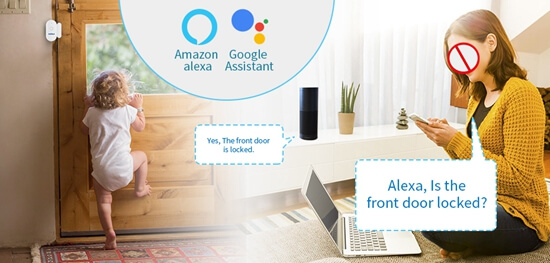
How Do You Connect Smart Life to Google Home?
Complete these steps only after the sensor works correctly in Smart Life:
- Open the Google Home app and select Add or Devices.
- Choose the option for a device that works with Google Home.
- Search for Smart Life or the approved OEM app service.
- Sign in with the same account and region used during Smart Life pairing.
- Authorize account linking and allow Google Home to discover devices.
- Assign the exposed sensor to the correct home and room.
- Open and close the door, then check whether the state updates.
Menu names may change. Account linking does not guarantee that every Tuya device or data point will appear in Google Home.
What Can a WiFi Door Sensor Google Home Setup Support?
A properly exposed WiFi door sensor Google Home integration may show open or closed status, make that state available as an automation starter, or allow another compatible device to respond. For example, an opening event may trigger a compatible light or siren.
Capabilities vary by product and platform release. Smart Life notifications and Google Home automations are separate; a Smart Life push alert does not automatically become a Google Home announcement. Validate voice queries, history, routines, sharing, and notifications on the intended firmware and market.
Safe B2B wording is: “Supports Smart Life; Google Home functions depend on the tested device configuration and available platform capabilities.” Do not promise announcements, routine starters, or real-time status until a sample confirms them.
How Does WiFi Door Sensor Google Home Notification Logic Work?
When the door opens, the sensor sends the magnetic state change through the router to Tuya. Smart Life may display it, store a record, send a push notification, or launch a scene. Supported information can then be exposed to a linked Google Home account.
Battery condition, WiFi coverage, internet access, app permissions, background restrictions, and phone settings can all affect delivery. Measure event-to-app latency under normal site conditions.
Why Does a WiFi Door Sensor Google Home Setup Fail?
Common WiFi door sensor Google Home problems include:
- The sensor was never fully added to Smart Life.
- The phone is onboarding the device on an incompatible WiFi band.
- The Smart Life and Google Home accounts use different regions or homes.
- The wrong third-party service was linked.
- The device category or data points are not exposed to Google Home.
- App permissions, background activity, or notifications are disabled.
- The sensor has weak WiFi, low battery, or outdated firmware.
- Google Home has not refreshed the linked account after a change.
Troubleshoot in order: physical event, Smart Life status, Smart Life notification, and Google Home visibility. Re-linking cannot fix incorrect firmware mapping or an unsupported function.
What Should a WiFi Door Sensor Google Home Checklist Include?
Before approving a sample or purchase order, test the following:
- Exact model, firmware version, Tuya product ID, and production region
- 2.4 GHz requirements and supported router security modes
- Smart Life onboarding on both Android and iOS
- Correct open/closed status and recovery after internet interruption
- Push notification content, delay, language, and repeat behavior
- Google Home account linking and device discovery
- Status visibility, automation eligibility, and response latency
- Low-battery reporting and offline indication
- Shared-home behavior and account-region limitations
- OEM app, packaging, manual, QR code, and privacy-policy consistency
Importers developing private-label products should also evaluate Tuya WiFi door sensor OEM requirements, including app branding, packaging, firmware consistency, MOQ, and regional compatibility.
Record screenshots and dates. Repeat the WiFi door sensor Google Home test after any module, firmware, app panel, or cloud configuration change.
FAQ
1. Can a Tuya WiFi door sensor lock or unlock a door?
No. A contact sensor only detects and reports open or closed status. Door movement requires a separate compatible smart lock or actuator.
2. Does every WiFi door sensor Google Home integration work?
No. Compatibility depends on the product category, firmware, mapped data points, account region, and current Google Home support. Test the exact sample.
3. Is Smart Life required before connecting Google Home?
For this cloud-to-cloud workflow, the sensor is normally paired and tested in Smart Life first. The Smart Life service is then linked in Google Home.
4. Does the sensor require 2.4 GHz WiFi?
Many models do, but buyers must check the specification for the exact product. Do not assume support for 5 GHz or enterprise WiFi.
5. Can Google Home announce when a door opens?
Possibly, but this is not universal. Device exposure, automation starters, speaker actions, region, and current platform capabilities must all support the scenario.
6. Why does the device appear in Smart Life but not Google Home?
The account may need refreshing, or the sensor category and data points may not be exposed through the linked service. Confirm the account region and tested integration.
7. Are Smart Life alerts the same as Google Home notifications?
No. They are configured and delivered by different platforms. Validate each alert path separately during sample testing.
8. What should importers test before bulk purchasing?
Test onboarding, accuracy, alert delay, WiFi recovery, battery reporting, account linking, Google Home visibility, and automations on final firmware.
Conclusion
A Tuya sensor detects entry status, reports events, and triggers connected actions; it is not a door-control device. A reliable WiFi door sensor Google Home solution requires verified data-point exposure, stable Smart Life performance, and accurate platform claims.
Sumring supports B2B buyers with sample evaluation, OEM/ODM branding, packaging customization, and compatibility verification. Share your target country, app, network, automation scenario, and Google Home expectations so the correct configuration can be tested before bulk ordering.